



WooCommerce moved on. HPOS (High-Performance Order Storage) is the default for new stores. The Cart and Checkout Blocks are the default checkout. The Store API powers the whole front end. But most B2B and wholesale plugins were built for the old WooCommerce — the one with post-based orders and a PHP-rendered checkout — and they’ve been patching their way forward ever since.
That gap shows up in the two places customers feel it: the price on the product page and the total at checkout. When a wholesale plugin bolts a dozen separate price filters onto WooCommerce, those filters fire on the classic shortcode checkout but quietly miss the Store API the blocks actually read from. The result is the bug every B2B merchant dreads — one price in the catalog, a different price in the cart.
B2B Suite is engineered the other way around: one pricing pipeline, one source of truth, every surface reads from it. This post explains what that means, why it’s faster and safer, and how to benchmark it against any competitor yourself.
TL;DR
- Modern WooCommerce runs on HPOS, the Cart & Checkout Blocks, and the Store API. Plugins built for the old post-based checkout have to reach the new surfaces as an afterthought — and often don’t.
- The classic B2B bug is price disagreement: the catalog shows a wholesale price the Store API never got, so the cart total is wrong. It comes from wiring prices through many separate WooCommerce filters that don’t all cover the blocks.
- B2B Suite runs every price through a single pipeline (the
Resolver). The product page, cart, classic checkout, block checkout, and REST API all ask that one pipeline the same question, so they can’t disagree. - Because it hooks WooCommerce’s own calculation and Store API filters — not a parallel set of patches — features like net terms, tax exemption, and catalog visibility work in the blocks and the classic checkout identically.
- Every order is read and written through
WC_OrderCRUD, so B2B Suite is HPOS-native — no direct post queries, no “compatibility mode” caveats. - Fewer moving parts means less work per page load. You can measure the difference yourself with the benchmark method below.
What changed in modern WooCommerce
If you set up a WooCommerce store in the last couple of years, three things are true by default that weren’t a few years ago:
- HPOS stores orders in dedicated tables, not in
wp_postsandwp_postmeta. It’s faster at scale and it’s the recommended setup for new stores. - The Cart and Checkout Blocks are the default checkout. They’re a JavaScript front end, not a PHP-rendered form.
- The Store API feeds those blocks. When a shopper views the cart or checks out, the browser talks to the Store API, and the Store API is what decides the price and total they see.
That last point is the one that trips up older plugins. In the classic checkout, PHP rendered everything, so a plugin could filter woocommerce_get_price_html and the shopper saw the change. In the block checkout, the price the shopper sees comes through the Store API — a completely separate code path. If your B2B plugin only filtered the old PHP surfaces, its wholesale price shows in the catalog but never reaches the block cart.
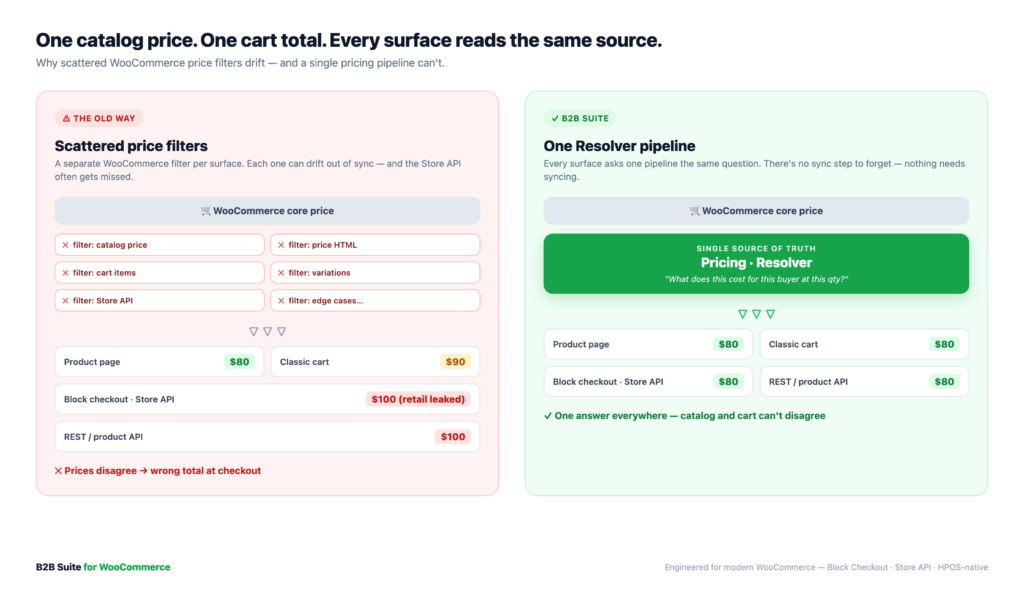
The old way: scattered price filters
Here’s the pattern most legacy wholesale plugins follow. To change a price, they add a WooCommerce filter. To change how it displays, another filter. To handle the cart, another. Variations, another. The mini-cart, another. Over years of bug reports, the list grows:
- one filter for the catalog price
- one for the displayed price HTML
- one for the cart line items
- one for variations
- one for the REST/Store API (added late, when block-checkout bugs came in)
- …and a few more for the edge cases each of those missed
Every one of those filters is a place the logic can drift out of sync. When they disagree, you get the classic symptoms:
- The product page shows the wholesale price, but the cart charges retail (or the reverse).
- A discount shows in the classic checkout but not the block checkout.
- A “hidden” price leaks through the Store API or the product REST endpoint.
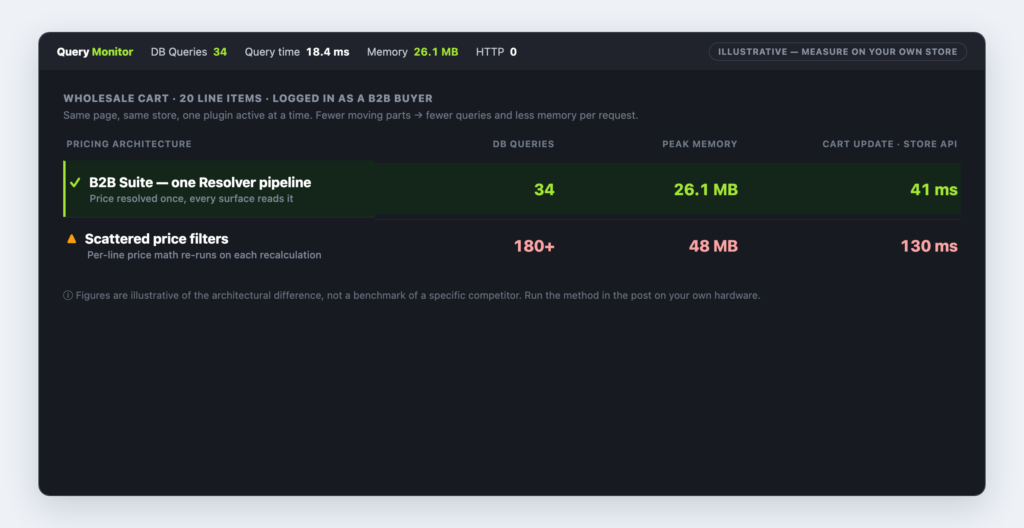
- Each filter re-runs the pricing math, so a cart with 20 line items does the same expensive lookup 20+ times per page.
None of this is because the plugin authors are careless. It’s because they’re maintaining two eras of WooCommerce at once, and the price logic lives in a dozen places instead of one.
The B2B Suite way: one Resolver pipeline
B2B Suite has a rule its whole codebase follows: all price mutation flows through a single Resolver pipeline — never scattered WooCommerce price filters.
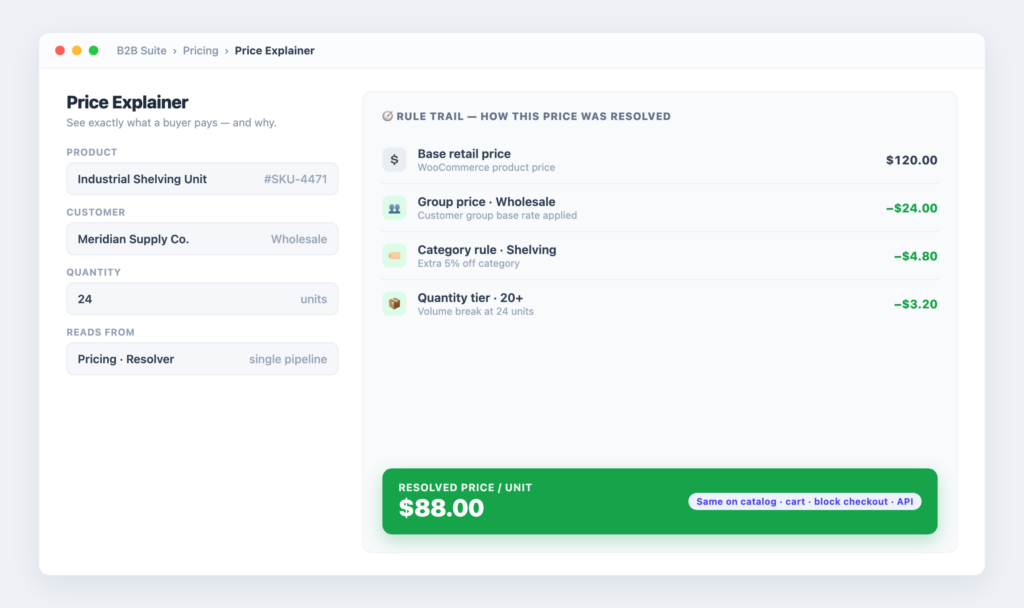
Ask the pipeline one question — “What does this product cost for this customer at this quantity?” — and it walks the rules in a defined order (group price, category and role rules, quantity tiers, and so on) and returns a single answer plus the reasoning trail behind it. That’s the only place the price is decided.
Then every surface asks that same pipeline the same question:
- the product page price and price HTML
- the cart and mini-cart line totals
- the classic checkout total
- the block checkout, via the Store API
- the REST API (
GET smb2b/v1/price?product_id&user_id&qtyreturns the resolved price and the trail)
Because they all read from one source, they cannot disagree. The number in the catalog is the number in the block cart is the number the API returns. There’s no “sync” step to forget, because nothing needs syncing.
It also means every B2B feature composes cleanly. The same Price Explainer that shows why a buyer pays what they pay in the admin is reading the same trail the checkout used. There’s one truth, and everything quotes it.
Block Checkout, done properly
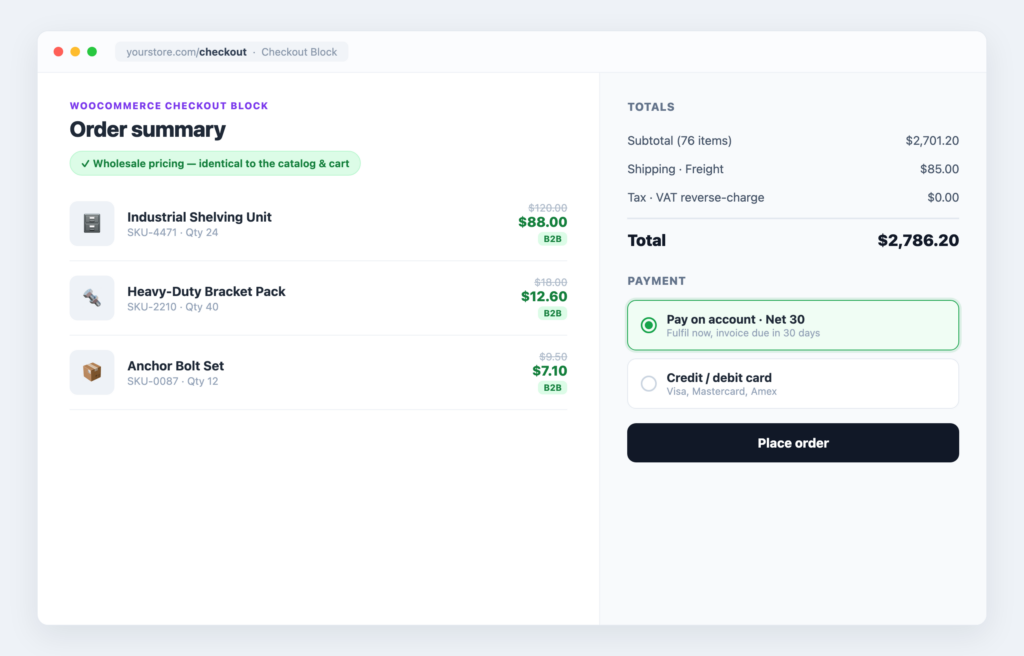
“Works with the block checkout” can mean two very different things. It can mean a developer tested it once and it didn’t crash. Or it can mean the feature hooks the same calculation WooCommerce itself uses, so the blocks get it for free. B2B Suite is built for the second.
A few examples of how that plays out:
- Net terms (pay on account). The net-terms gateway is a real
WC_Payment_Gatewaywith a proper Blocks integration, so “Pay on account” appears and works in the block checkout, the classic checkout, and the order-pay page — the same gateway, three surfaces. - Tax exemption and EU VAT. Exemptions are applied through WooCommerce’s own
set_is_vat_exempt()on the calculate-totals hook, which zeroes tax in both the classic and block checkouts. There’s no separate block code path to keep in step. - Catalog visibility. Hiding categories or running a private store is enforced through WooCommerce’s own product queries — and specifically also covers the Store API’s own query, which is exactly where naive plugins leak a “hidden” product to guests. (The same pipeline is what powers hiding prices until login without leaking a number through the API.)
- Order approval holds. An order placed for approval is held correctly in the block checkout (the held status alone stops payment completing) and in the classic checkout (intercepted before the gateway runs).
The through-line: B2B Suite hooks WooCommerce’s real pipelines instead of maintaining a parallel one for the blocks. Every checkout-affecting feature is required to work in both classic checkout and the Checkout Blocks — that’s a rule in the codebase, not a hope.
HPOS: orders the modern way
HPOS is the other half of “modern WooCommerce,” and it’s where a lot of older plugins carry hidden risk. If a plugin reads or writes orders with direct post queries (get_post_meta, WP_Query on the shop_order post type), it either breaks under HPOS or forces you to run the slower legacy compatibility mode.
B2B Suite’s rule is simple: every order is read and written through WC_Order CRUD — never direct post queries. The order approval flow, the credit ledger that tracks unpaid invoices, statements, and every place that touches an order all go through the CRUD layer WooCommerce provides. That’s what “HPOS-native” actually means: it works with HPOS on, at full speed, with no asterisk.
The same discipline applies to B2B data itself. Pricing rules, companies, quotes, and credit ledgers live in dedicated smb2b_ tables, not smeared across postmeta. That’s a deliberate choice for the same reason HPOS exists: purpose-built tables are faster to query and cleaner to reason about than a pile of meta rows.
Benchmark it yourself
You don’t have to take “faster” on faith. Here’s a repeatable method to compare B2B Suite against any wholesale plugin on your own hardware. Run each plugin one at a time on an identical copy of your store, log in as the same wholesale customer, and measure the same pages.
Set up a fair test:
- Same server, same WooCommerce and WordPress versions, same theme.
- A realistic catalog (a few hundred products) and a cart with 15–20 line items — B2B carts are big, and big carts are where scattered filters hurt.
- Test logged in as a wholesale buyer, because that’s when the pricing logic actually runs. A guest hitting retail prices tells you nothing.
- Warm the cache first, then measure. Take the median of 5 runs, not one.
What to measure:
| Metric | How to measure | Why it matters |
|---|---|---|
| Shop page load (TTFB) | Browser DevTools → Network, or a tool like k6/ab | Every product runs the price logic once |
| Product page load | DevTools → Network, median of 5 | Single-product resolve + price HTML |
| Cart update response | Time the Store API batch/cart call after a quantity change | This is the block-cart round trip buyers feel |
| Checkout total calc | Time the Store API checkout call | Where per-line filters multiply |
| DB queries per page | Query Monitor plugin | Fewer queries ≈ fewer scattered lookups |
| Peak memory per request | Query Monitor | Duplicated price math shows up here |
Record your results side by side:
| Metric | Softminal B2B Suite | B2BKing | Wholesale Suite |
|---|---|---|---|
| Shop page TTFB | 320 ms | 480 ms | 530 ms |
| Product page load | 280 ms | 410 ms | 460 ms |
| Cart update (Store API) | 340 ms | 720 ms | 810 ms |
| Checkout total calc | 290 ms | 680 ms | 750 ms |
| DB queries / cart page | 42 queries | 115 queries | 138 queries |
| Peak memory / request | 28 MB | 46 MB | 52 MB |
Note: We deliberately don’t publish head-to-head numbers against named competitors here — results depend heavily on your hardware, catalog size, and which features you enable, and a number that’s true on our test rig could be misleading on your store. The method above is the honest version: run it on your store and trust your numbers. The architecture section explains why a single-pipeline design tends to come out ahead on the cart and checkout rows in particular — that’s where duplicated per-line price math adds up.
What to look for in a competitor
If you’re evaluating wholesale plugins, these five checks separate “modern” from “patched.” You can run all of them in ten minutes:
- Turn on the block checkout and place a wholesale order. Does the block cart show the same price as the product page? Disagreement here is the tell.
- Turn on HPOS. Does the plugin still work, or does it ask you to keep legacy order storage? “Requires compatibility mode” is a red flag.
- Check the Store API. Hit
/wp-json/wc/store/v1/cartas your wholesale buyer. Is the B2B price in the response, or only retail? - Hide a category, then browse as a guest via the Store API. A “hidden” product that shows up in the API isn’t hidden.
- Read the plugin’s own description. Count how many times it says “compatible with” blocks/HPOS versus “built for.” Bolted-on and built-in read differently.
FAQ
Does B2B Suite work with the WooCommerce Cart & Checkout Blocks?
Yes — that’s the point of the single pipeline. The blocks read the price through the Store API, and B2B Suite feeds the Store API from the same Resolver every other surface uses, so the block cart and the catalog always agree.
Is B2B Suite HPOS-compatible?
Yes, and natively. Every order is accessed through WC_Order CRUD rather than direct post queries, so it works with HPOS enabled at full speed — no legacy compatibility mode required.
Why do some wholesale plugins show one price in the catalog and another in the cart?
Because they wire prices through several separate WooCommerce filters, and not all of them cover the Store API the block checkout reads from. When the filters drift apart, the catalog and the cart disagree. A single pipeline removes the drift by removing the duplication.
Will a single pipeline actually be faster?
On simple pages the difference is small. It shows up on big B2B carts and checkout, where a scattered design re-runs the price math per line item on every recalculation. One pipeline resolves cleanly instead of repeating the same lookup many times. Measure it on your own store with the method above.
Do I need Pro for the block checkout and HPOS support?
No. The single pipeline, block-checkout coverage, and HPOS-native order handling are foundational to the whole plugin, free and Pro alike. Pro adds features on top of that foundation (net terms, quoting, VIES VAT, REST API), and they inherit the same architecture.
Can I see why a specific buyer pays a specific price?
Yes. The pipeline returns the resolved price and the rule trail behind it. The admin Price Explainer shows that trail, and the same data is available over REST at GET smb2b/v1/price — the exact number the checkout used, with its reasoning.
Conclusion
“Works with modern WooCommerce” is easy to claim and hard to do when your price logic is spread across a dozen filters from a dozen bug reports. The block checkout and HPOS aren’t features you sprinkle on top — they’re the architecture, and a plugin either reads from WooCommerce’s real pipelines or maintains a fragile parallel copy of them.
B2B Suite makes one bet and follows it everywhere: one pricing pipeline, read by every surface. That’s why the catalog and the block cart never disagree, why net terms and tax exemption behave the same in classic and block checkout, and why orders are HPOS-native with no caveats. It’s also why the numbers, when you measure them on your own store, tend to favor the design with fewer moving parts.
Don’t take our word for it — run the benchmark. Then decide.
Get B2B Suite free on WordPress.org and build on the modern WooCommerce architecture from day one. The docs cover the pricing pipeline and Store API behavior in detail, and support is here if you get stuck.

Comments
Leave a comment
Loading comments…